


Kiive Audio
Opto-style tube compressor
The tube compressor you’ll reach for first.
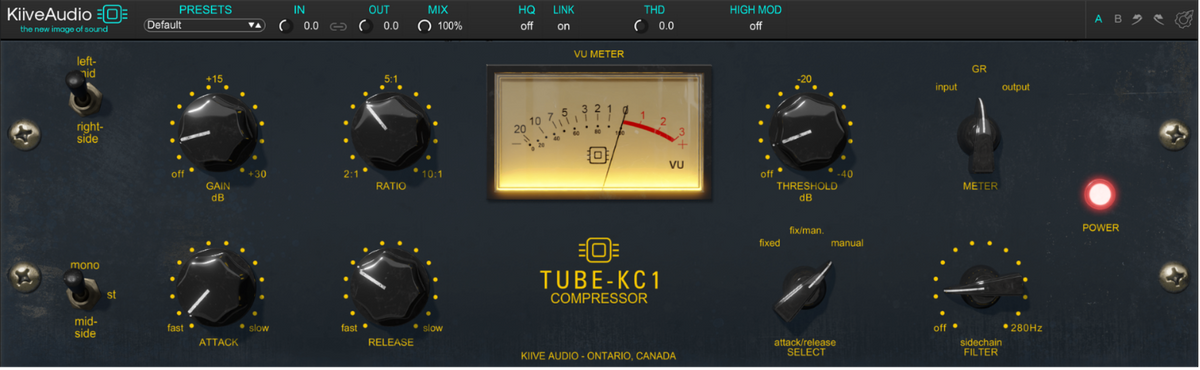
KC1 brings smooth opto-style tube compression to your sessions, with three timing modes and the flexibility to go well beyond the original response. Ease into gentle leveling, push for more sustain or blend a heavier setting with your uncompressed audio.

The KC1 response
Explore the controls that shape the compression, from the first transient to the way it recovers.

KC1’s soft knee brings compression in gradually, with ratios from 2:1 to 10:1 for anything from gentle leveling to firmer dynamic control.
Use Attack to let more of the initial transient through or catch it sooner, then adjust Release to control how quickly the compression recovers. The Gain control lets you set the level after compression.

KC1’s sidechain high-pass filter adjusts up to 280 Hz, reducing how strongly low frequencies affect the compression. Your low end stays in the audio while the compressor responds more evenly to the rest of your mix.

Fixed uses the original attack and release settings. Choose Manual when you want to set both timings yourself, from a faster response that catches transients to slower settings that let more of the initial attack through.
Fix/Man combines a fast attack with a release that responds to your audio and the Release setting. You can adjust the recovery while letting it adapt to changes in the performance.

Lower the Threshold to bring more of your signal into compression, or raise it for gentler control of the louder moments.
Switch the VU meter between input, output and gain reduction to check your levels and see how much compression you’re applying.
Built for your sessions

Blend the compression with your dry audio using Mix, and adjust the amount of harmonic distortion with THD. High Mod subtly changes how KC1 compresses the highs for a slightly less grabby response at the top end.
Link the left and right channels for stereo processing, choose your oversampling setting and adjust input and output levels from the same bar.
Use A/B to compare two settings, revisit changes with undo and redo, and save your own custom presets.
“This is the one for me, as it’s on multiple tracks in every single mix.”
Watch & listen
Kiive Audio

Audio Animals Studio

Spinlight Studio
Choose two eligible plugins and save with a bundle built around your sessions.
Combine two bus processors with swappable modules and a rearrangeable signal chain.
Download KC1 and try the full plugin free for 14 days in your own sessions.
Have a question about KC1 or getting it running in your session? Send us a message and we’ll help you get sorted.
Talk to us