

Low-pass
Open and close the top end, from a darker pulse to a broad, bright sweep.
Paradox FX series · Modulated filtering
Find a new rhythm.
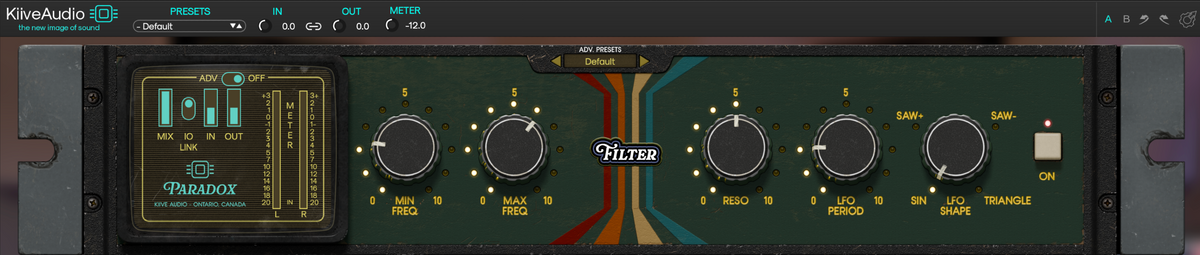
Turn a sustained sound into a pulse, add a slow sweep across a phrase, or make the filter follow your track’s tempo. Mod Filter gives you control over the range, rhythm and stereo movement, from gentle auto-wah to patterns that change the groove of your song.
Frequency range & resonance
Bring Min and Max close together for a focused pulse, or open the range for a sweep that changes the whole sound. Swap their positions to reverse the direction.
Add resonance to bring the moving cutoff forward, from a smooth change in tone to a more pronounced wah-like sound.

Set the range. Let the pattern move through it.
LFO shape & timing
Move smoothly between the limits, rise and fall at an even rate, or use a repeating ramp with a quick reset. Sync locks the cycle to a note division in your track.
Sine slows at the ends of the range and moves faster through the middle, giving auto-wah and longer sweeps a smooth rise and fall.
Saw + rises through the range and resets quickly. Use it for an opening pattern that repeats with the groove, then soften the reset with LFO Smooth if it feels too sharp.
Saw − falls through the range before jumping back to the top. It gives your sound a closing motion, with LFO Smooth available to make the reset more gradual.
Triangle travels up and down at a steady rate. Its symmetrical cycle gives your music a clear, regular pattern.
Four filter types
Open and close the top end, from a darker pulse to a broad, bright sweep.
Let the low end fall away and return, changing the weight with each cycle.
Concentrate the sweep around a narrower band for a more vocal, wah-like quality.
Move a cut through the spectrum for a phaser-like shift in tone.
Stereo phase
Offset the left and right LFOs so they reach different points in the same cycle. The filter can move across the stereo field while keeping its rate and shape.
Keep the channels together for a focused pulse, then spread the motion when the arrangement needs more space.

Use Sync for musical note divisions, or free-running timing for movement that drifts against the beat. Mix, A/B and your own presets keep comparisons close by.
Hear what it does
Compare the original recordings with rhythmic filtering and stereo movement.
Hear Paradox | Mod Filter
What Mod Filter users are saying.
Build your Paradox
Put Mod Filter after PlasmaVerb to give a long tail a repeating pulse, or after Stereo Distortion to sweep through the new harmonics. Change the order and hear how differently the effects react.

Download Mod Filter and try the full plugin free for 14 days in your own sessions.
Have a question about Mod Filter or getting it running in your session? Send us a message and we’ll help you get sorted.
