

November 04, 2026
M5133 vs VX-Q: Which Kiive EQ Fits Your Mix?

M5133 and VX-Q can both change the tonal balance of a mix and add color, so choosing between them is not as simple as “clean EQ or saturation.” The better starting question is how you want to work: small finishing decisions across a mix, or a flexible EQ and transformer stage you can shape around individual instruments as well as buses?
M5133 brings three generations of mastering-oriented EQ together with Delta Solo and three saturation flavors. VX-Q pairs musical EQ with five transformer models and detailed saturation controls. Both can stay restrained or become more colored, and neither is limited to one place in your session.
Choose by the decision in front of you
| What you are working on | A useful first choice | What to compare |
|---|---|---|
| Small finishing moves across an almost-complete mix | M5133 | Try a small tonal change, then use Delta Solo to hear what that adjustment adds or removes. |
| Tone and transformer character on a vocal, guitar, drum or bus | VX-Q | Find the EQ balance first, then compare transformer models and the amount of saturation. |
| Different EQ responses within one finishing workflow | M5133 | Compare its three EQ generations with a similar musical aim. |
| Clean EQ with the option to introduce more varied transformer color | VX-Q | Begin with color kept out of the decision, then bring it in deliberately. |
These are starting points. M5133 can work on individual instruments, and VX-Q can work on a mix bus. The name of the plugin should not override the result you hear.
Where M5133 earns its finishing role
When a mix is close, a half-dB change can be enough to make the vocal sit more comfortably or give the low end a better balance. M5133 is built around that kind of decision, with four variable bands, filters and a choice of three EQ generations.
Delta Solo helps you hear what an EQ adjustment is adding or taking away. It is not simply a band-pass solo of the selected frequency area. Use it to understand the change, then return to the full mix to decide whether that change belongs there.
Try this when a broad adjustment sounds promising but is difficult to judge. Make the move, listen to the difference it creates and compare bypass at a similar level. If the guitar becomes clearer while the cymbals become too prominent, adjust the band rather than assuming the first improvement justifies the whole change.
M5133 also provides three saturation flavors. You can use them alongside a small EQ move, work mainly on color or keep the color restrained while finishing the tonal balance. “Mastering EQ” does not mean it must always sound subtle, and it does not mean it should only appear on the final output.
Where VX-Q gives you more ways to explore color
VX-Q is useful when the EQ balance and harmonic texture are both part of the instrument you are shaping. You can keep it relatively clean, or compare five transformer models as you introduce more saturation.
Its low and high bands offer shelf or bell shapes, while the mid bands provide additional focusing options. That lets you move between broad tonal changes and a more targeted adjustment without treating the EQ as a fixed smile-shaped curve.
The transformer stage can come before or after the EQ. That order is worth auditioning: EQ before a nonlinear stage changes the frequency balance feeding that stage, while EQ after it reshapes the processed result. The amount of drive and the musical material affect how obvious the difference becomes.
Start with one transformer model and make a modest adjustment. Compare at a matched level, then try another model without changing the EQ at the same time. This makes it easier to hear whether the additional weight or texture helps the instrument sit in the arrangement.
For the underlying mechanism, read how transformer saturation adds harmonics. Transformer color is not a fixed recipe of one harmonic type; level, frequency and the surrounding implementation influence the result.
Clean and colored are options in both plugins
Do not choose M5133 only because you assume it is the clean one, or VX-Q only because you assume it must sound saturated. Both let you work on EQ and color, with different choices and listening tools around those tasks.
If you already like the tone of the recording, begin with the saturation kept subtle. If the instrument needs more character, compare that separately from a large EQ change. A louder, brighter version can sound more impressive immediately without fitting the mix any better.
Our guide to even and odd harmonics explains the language around those changes. Use that knowledge to guide a listening comparison rather than predict a preferred sound from a harmonic label alone.
A useful comparison in your own session
- Choose a passage with the instruments you need to balance, plus another section with a different density.
- Begin with color kept out of the comparison as far as the available controls allow.
- Give each EQ the same musical task, such as slightly less low-mid buildup or a gentler top-end lift. Do not assume identical knob positions produce identical curves.
- Match the output level and compare within the full mix.
- In M5133, use Delta Solo to inspect the EQ change, then return to normal monitoring.
- In VX-Q, compare transformer models and processing order separately from the EQ decision.
- Recheck the quieter section before keeping a setting that works in the chorus.
A finishing move should make sense across the music, while an instrument effect may be deliberately more pronounced. Keep that purpose clear as you compare, rather than rewarding the version that changes the audio most.
When using both makes sense
You might use VX-Q to shape individual instruments and M5133 for the small adjustments that bring the completed mix together. You could also choose either plugin for both roles if that is the response you prefer.
Start with the job that is currently unresolved, then audition the relevant plugin. Both have fully functional 14-day trials, so you can hear them in your own session before deciding whether one or both belongs in your chain.
Explore Kiive Plugins
Want to apply what you learned in your own mixes? Every Kiive plugin includes a fully functional 14-day trial with no card required.
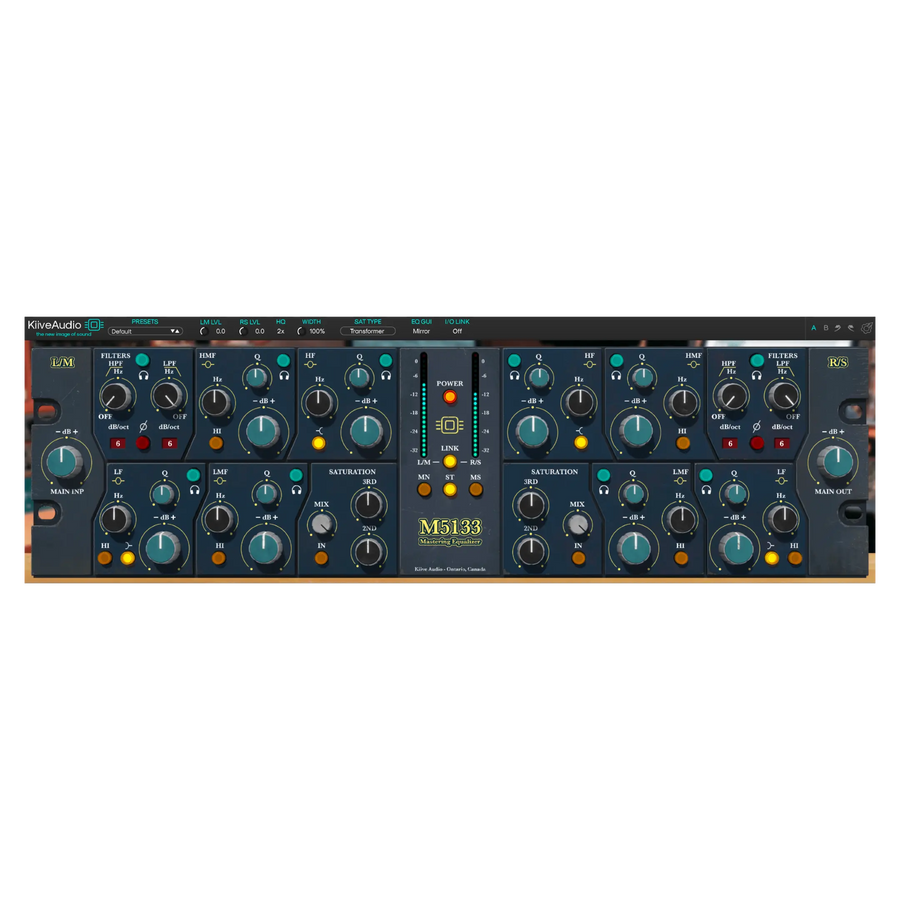
M5133 | Mastering Equalizer
Make finishing EQ decisions with three EQ generations, Delta Solo and three saturation flavors.

VX-Q
Shape tracks or buses with musical EQ, five transformer models and adjustable saturation.