

Kiive Audio
Saturation & dynamics
Saturation with a whole lot more to offer.
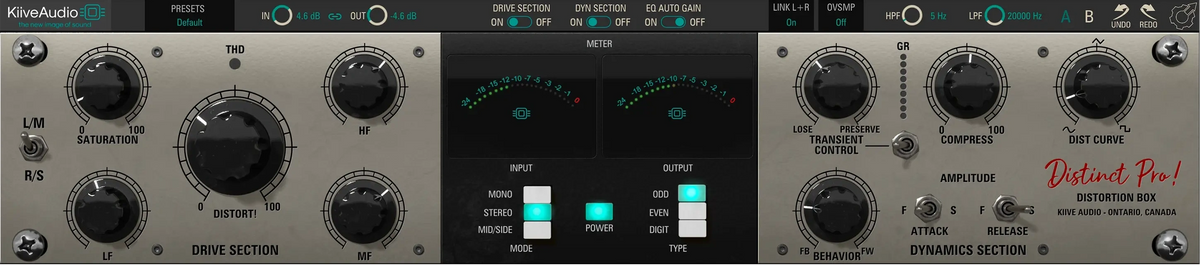
Distinct Pro brings three types of saturation and a flexible dynamics section into one processor. Add a light harmonic lift or push into obvious distortion, then keep more of the initial attack or smooth it into the body of the sound.
Tone and dynamics
Work on the tone and the dynamics together.
Distortion can bring a recording forward while compression changes the way it moves. Distinct Pro lets you shape those two parts together, with independent Drive and DYN sections that you can use separately when you only need one.
Tone and dynamics
Work on the tone and the dynamics together.
Distortion can bring a recording forward while compression changes the way it moves. Distinct Pro lets you shape those two parts together, with independent Drive and DYN sections that you can use separately when you only need one.
The Drive section
Saturation and EQ work together here, so the frequencies you feed in influence the sound you get back.

Choose ODD, EVEN or DIGIT, then use Distort and Saturation together to move from a restrained harmonic lift to heavier distortion. Each type responds differently, giving you a choice in the tone as well as the amount you add.
Odd-order harmonics give this mode its more assertive distortion character. Use a little for a subtle change in texture, or push Distort when you want the effect to be clearly heard.
Even-order harmonics offer a smoother saturation character. Distort and Saturation still give you room to push it harder, while starting from a different harmonic balance.
DIGIT uses soft clipping to round the peaks. It gives you another way to add saturation, with a different response from the ODD and EVEN modes.
Low, mid and high EQ controls sit before saturation, so a boost or cut changes what gets driven. Push more low end into the process, pull back the mids or favor the highs, with EQ Auto Gain helping to compensate for the level change as you adjust the tone.
The Dynamics section
Go from softer feedback compression to a more aggressive feed-forward response, then use Transient Control to soften the attack or bring it forward. It works after the compressor, so you can shape the initial impact separately from the compression.

Behavior changes the compression style along with its ratio and knee. Move toward FB for a softer response or toward FW for more aggressive compression, then set the amount with Compress.
The Lose/Preserve control acts after compression. Use it to reduce an overly sharp attack or retain more of the initial impact as you work on the overall dynamics.
Fast and slow attack and release settings let you change how quickly the compressor reacts and recovers. Dist Curve subtly changes the harmonics generated by the compression circuit.
Built for your sessions
Adjust your channels together or work on them independently, then compare your changes and save the settings you want to keep.


Choose stereo, dual mono or mid/side, then use the L/M and R/S controls to work on the corresponding channels. Link their settings when you want to adjust them together.
Control the levels and hear each section on its own.
Adjust Input and Output, link them for gain compensation, and switch Drive or DYN out independently. High-pass and low-pass filters let you trim the frequency range, while EQ Auto Gain compensates for changes in the pre-saturation EQ.
Compare settings and save your favorites.
Use A/B, undo and redo to compare your changes, save your own presets, and choose your oversampling setting from the top bar.
“Very good all in one tone shaping box not just saturation”
Watch & listen
Kiive Audio

In the DAW

Spinlight Studio
Use XBus for a separate VCA compression stage, with sidechain filtering and parallel blend to shape how your group or mix responds.
Explore a different approach to saturation with three tube circuits and built-in compression.
Balance the tone with VX-Q’s four-band EQ, or add one of its five transformer modes alongside Distinct Pro’s distortion.
Try the complete Distinct Pro! plugin free for 14 days in your own sessions.
Have a question about Distinct Pro or getting it running in your session? Send us a message and we’ll help you get sorted.
Talk to us