

Paradox FX series · Chorus, vibrato & rotary
VC Rotary
Give your music the motion of a rotating cabinet.
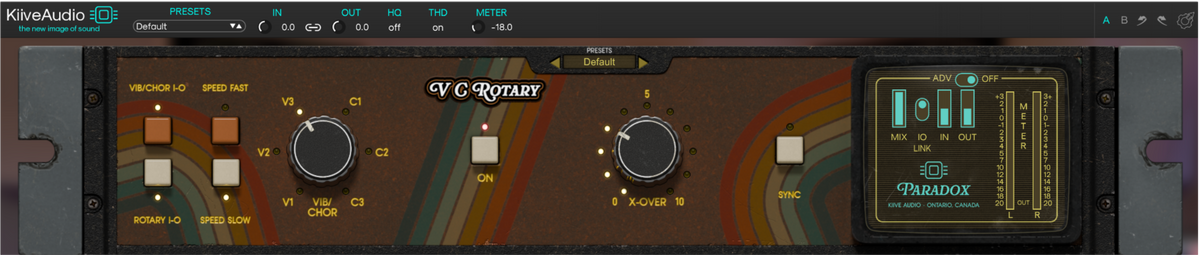
VC Rotary combines six chorus and vibrato voices with the sweep of a dual-rotor speaker cabinet. Move from a slow, spacious swirl to a fast, pulsing rotation, with independent rotor speeds and tube-style drive to shape the sound.
Two rotors in motion
From a slow swirl
to a fast, pulsing spin.
The low drum and high horn can move at different speeds, giving the rotation its changing depth and stereo movement. Switching between Slow and Fast lets the sound accelerate and settle like a rotating speaker.
Slow & fast
Hear the speakers accelerate and settle.
Move between the two speed settings for a gradual spin-up or spin-down. Automating the switch can open up a sustained sound or add movement as your music moves into the next section.
Independent rotors
Give the low and high bands different movement.
Set the low and high rotor speeds separately, then use X-Over to choose where the two bands divide. Contrasting speeds create a more complex motion than turning the entire signal at one rate.
Tempo sync
Bring the rotation into the rhythm of your song.
Use Sync when you want the rotor speeds to follow tempo divisions. Switch it off to set the speeds freely and let the movement drift against the track.

Chorus and vibrato
Six voices before
the speakers start turning.
Choose from three vibrato and three chorus voicings, ranging from gentle pitch movement to a deep wobble or a thick ensemble sound. Layer them into the rotary cabinet, or bypass the rotors and use the modulation on its own.
Vibrato
The three vibrato settings move from a slow, narrow pitch drift to a faster, more pronounced wobble.
Chorus
The three chorus settings build from light stereo movement to a deeper, fuller ensemble. All six voicings create a stereo image.

Cabinet character
Shape the cabinet
around your sound.
Add harmonics with tube-style Drive, then adjust the motion, microphone spread and tone of the rotary cabinet. You can keep the movement understated or bring the sweep of the speakers right to the front.
Pitch and pulse
FX Depth changes the Doppler pitch movement, from tremolo alone to the full rotary pitch swing. Roto Blend adjusts how much of the rotor effect comes through.
Stereo spread and tone
Mic Offset changes the stereo microphone spread. XO Split balances the low and high rotor bands, while LP Filter softens the cabinet’s top end.
Use the global Mix for parallel processing, linked input/output levels for gain adjustments and A/B to compare settings. Switch THD off when you want the modulation without added saturation.
Hear Paradox | VC Rotary
Hear VC Rotary in action

What VC Rotary users are saying.
Rotary into PlasmaVerb
Let the motion carry into the space.
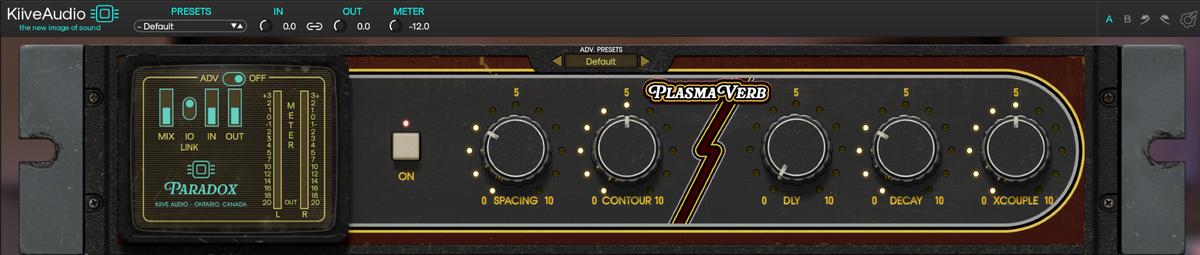
Follow VC Rotary with PlasmaVerb to hear the rotating sound open into a plate-style reverb. Keep the decay close for a little space, or push Contour for pitched reflections that follow the movement into the tail.
Explore the Paradox series
Good to know.
Your mix is the best demo.
Download VC Rotary and try the full plugin free for 14 days in your own sessions.
Need a hand?
Have a question about VC Rotary or getting it running in your session? Send us a message and we’ll help you get sorted.