

November 04, 2026
NFuse vs XBus: Which Bus Processor Should You Choose?

If you are choosing between NFuse and XBus, start with the work you want the plugin to do. Do you want to shape the tone, compression and stereo balance of a bus in one chain, or do you already like the tone and want more control over the way a compressor moves?
NFuse combines two approaches to bus processing, with interchangeable N and F stages. XBus concentrates on VCA bus compression, with detailed timing, sidechain, saturation and parallel controls. There is overlap, but one is a broader processing chain and the other gives a dedicated compression job more room.
The quickest way to choose
| What you want to do | Start with | Why |
|---|---|---|
| Work on EQ, saturation, compression and stereo balance in one bus chain | NFuse | Choose N or F stages independently and build the combination around your mix. |
| Keep your existing EQ and focus on the compression response | XBus | Its controls center on timing, detector response, parallel blend and compression character. |
| Compare two approaches to the tone and movement of the whole bus | NFuse | Audition different stage combinations rather than treating the plugin as one fixed processor. |
| Shape a drum or mix-bus compressor's response to low end and saturation | XBus | Explore the sidechain controls and saturation before or after compression. |
Neither choice is restricted to the master bus. Try the processing on drums, instrument groups and other buses where you can hear the relationship between individual hits and sustained music.
Choose NFuse when the bus needs several kinds of shaping
You may like the balance of the individual tracks but still want a different overall weight, top end or stereo presentation once they come together. NFuse puts those decisions beside the compression, rather than asking the compressor to solve them all.
The N and F choices are available independently across the processing stages. You can keep the saturation you like while comparing another EQ or compressor approach. The signal chain is rearrangeable too, so the combination is more flexible than a single fixed bus preset.
In a session, start with the stage that addresses the problem you can already hear. If the drum bus is too bright, make that tonal decision before adding compression. If the groove needs movement, begin with compression and leave the other stages out until they have a reason to join the chain.
The benefit is the range of combinations. It is not a requirement to turn on every stage, and more active modules do not automatically make a more finished mix.
Choose XBus when the compression is the main decision
XBus can do the VCA glue compression you expect, but that is only a small part of why we recommend it. You can work on the attack of a drum hit, the recovery between hits and how strongly the low end drives the gain reduction, then decide how much of that compressed sound to blend back in.
Its stepped and continuous timing options let you compare the familiar settings with values between them. Sidechain filtering helps you change what triggers the compressor, while Headroom gives you another way to explore its operating behavior. Listen to the kick, snare and cymbal sustain together rather than watching one gain-reduction peak.
Saturation can sit before or after compression, with odd and even harmonic controls available to shape its character. Putting saturation before the compressor can change the waveform that the compressor receives; placing it after compression changes the order of the two processes. Keep the output level comparable as you decide which result suits the music.
The built-in Mix control lets you compare a more heavily compressed sound with a blend of the dry audio. That is useful when you like the sustain and movement but want more of the original attack back.
NFuse's compressor is not automatically an XBus replacement
Both plugins can compress a bus, but matching a label or a few knob values does not establish the same response. The available controls, processing order and overall design differ. Choose by the behavior you hear in your own passage, rather than assuming one plugin contains an identical copy of the other.
If you own NFuse and are considering XBus, the useful question is whether its dedicated compression controls help you reach a result more directly. If you own XBus and are considering NFuse, the useful question is whether you want the surrounding tone and stereo stages, plus the freedom to combine N and F approaches.
Compare them without letting level decide
- Choose a loop with a strong kick and snare, sustained instruments and a quieter moment after a loud hit.
- In NFuse, begin with compression while leaving other processing stages out of the comparison.
- Set XBus to a similar amount of maximum gain reduction, then match the perceived output levels.
- Listen to the initial hit, the cymbal and room sustain, and how the bass changes the recovery. Similar meter readings are only a starting point.
- Try the controls that distinguish the plugins: XBus sidechain, saturation order and parallel blend; NFuse's alternative compressor approach and the surrounding stages.
- Return to the whole song before deciding which approach helps.
Our guide to why the same gain-reduction reading can sound different explains why a fair comparison takes more than matching a meter. For the broader mixing decision, read how bus compression works.
Can you use NFuse and XBus together?
Yes, if each has a clear job. You might use NFuse for bus tone and stereo shaping while XBus handles the compression response, or use them on different groups. Start with one processor, identify what remains unresolved and add the second only when it helps.
You do not need two compressors on a bus just because both plugins are available. Compare the simpler chain before keeping both, and compensate for level changes as you work. Both plugins offer fully functional 14-day trials, so you can make that choice in the sessions you know best.
Explore Kiive Plugins
Want to apply what you learned in your own mixes? Every Kiive plugin includes a fully functional 14-day trial with no card required.

NFuse | Bus Processor
Build a bus-processing chain with interchangeable N and F sections for saturation, EQ, compression and stereo control.
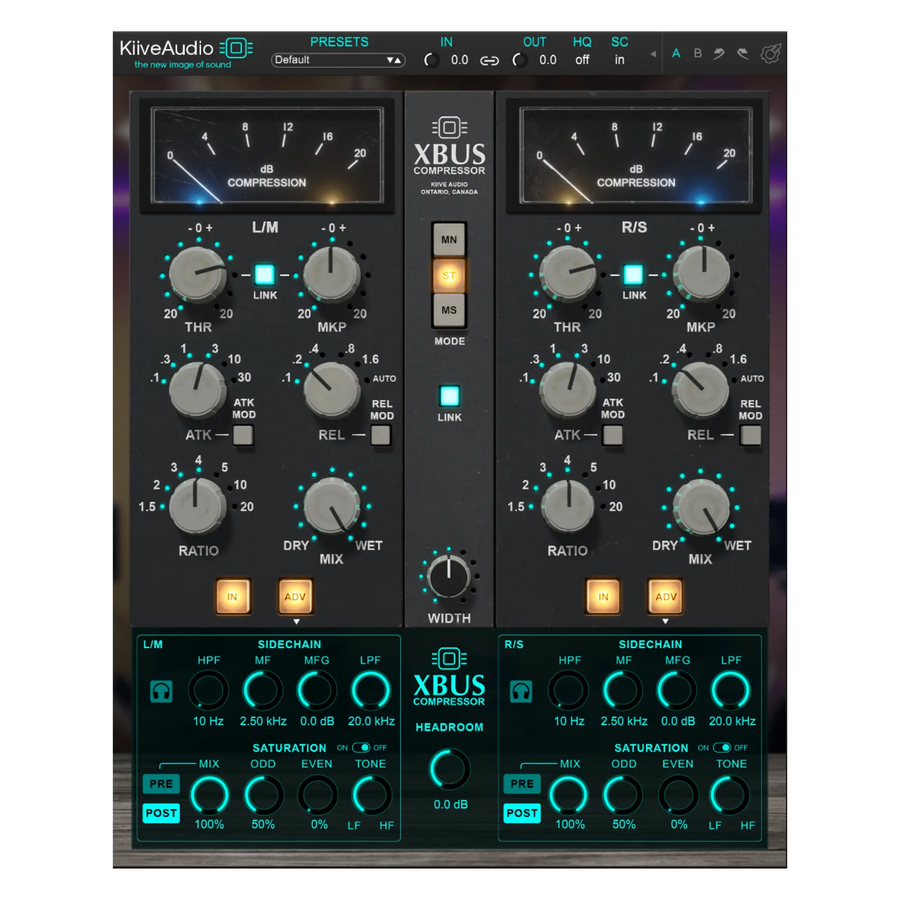
XBus
Focus on VCA compression, with detailed sidechain, saturation and parallel controls.